I am a fan of PlantUML; it is accessible, easy to use and you produce nice looking diagrams with minimal effort in a short period of time. The PlantUML script can be published and made available for collaboration.
The problem however it that the PlantUML script used to generate the diagrams are discrete declarations of behaviour. Validation and alignment against the Domain and or Enterprise landscape would typically be manual and the likely outcome would be model divergence.
The cost savings from the speedy delivery of fit for purpose models is long forgotten when the time comes to make changes.
I do believe there is a middle ground.. where Enterprise and Delivery teams operating at differing speeds can effectively work together. The solution centres around the ability to exchange models between the modelling platform and the script based diagraming tools.
Enterprise Architect does offer a number of methods for model exchange. The simplest being CSV imports, for high order elements, through to XMI import/export for full element, association and diagrams objects.
PlantUML does support XMI export, however at this point it only applies to Class diagrams.
So one solution to close this gap, I have cobbled together a VBScript to run with Enterprise Architect to allow a modeller to Generate a Sequence Diagram using a PlantUML script..
The following screen shot provide an example of what functionality is offered by the scripts.
- participant types of actor, control, boundary, entity and database
- boxing timeline elements
- color coding using either #RGB or HTML standard colors
- synchronous, asynchronous, return and message to self flows
- message grouping (alt, loop, critical etc)
- activate and deactivate of timelines
- return value and parameters
Sample PlantUML Script
Actor Schedular as S
Box System #lightgreen
Control Job
Participant widget
End Box
S ->> Job: before trigger()
loop process back log
Else job in queue
S ->> Job: trigger1()
Else after 1 hour
S ->> Job: trigger2()
Alt waiting over 2 hours
Else after 3 hours
S ->> Job: trigger3()
Job -> widget: do something
widget –>> Job: return
Job -> Job: process it
S ->> Job: trigger4()
Else after 4 hours
S ->> Job: trigger5()
activate Job
End
End
S ->> Job: after trigger()
deactivate Job
PlantUML Sequence Diagram
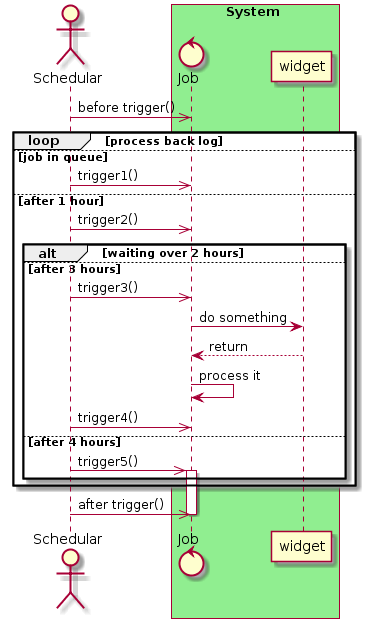
The following steps outline the process of creating the sequence diagram within EA:
- create a new sequence diagram
- add a note element and paste the desired plantUML script into it
- right click the Note element and select “Create Sequence Diagram via PlantUML”
- the following diagram is created

EA’s does have some restrictions on the way the flows can be laid out using the API.. and this is especially evident when using nested InteractionFragments. So please check the produced diagram to ensure correct flow placement.
The following features will be added overtime.
- header and footer
- coloring of the flows & activations
- notes
- dividers
- dialogue box to select PlantUML script from file the source repository or confluence page
Installation Instructions
Source code can be found at https://github.com/gobravedave/Enterprise-Architect

Download the collection of vbs files
In the scripting window with EA
- Create a new Diagram Scripting Group and name it “PlantUML“
- Create a new VBScripts and name it “Create Sequence Diagram via PlantUML“
- Cope and paste the contents of the file downloaded
- Creates a new Normal Scripting Group and name it “Common“
- Create a VBScript for each of the following vbs files downloaded:
- color-picker
- Print-Array
- Sort-Array

Note.. Script names are case sensitive.
Interested in your thoughts, recommendation and in the spirt of collaboration, I am more than happy if you want to check out the scripts and make any necessary updates.

 Model Helper
Excellent work! I have been looking for something like this for a very long time. — funny enough, I have been working on my own code this week to parse a PlantUML file into Sparx.
LikeLiked by 1 person
Great I hoped it was helpful for you Anthony. Some of the parsing is very basic and is dependant on the input scripts being PlantUML compliant.. It work well enough for my scripts and tested scenarios.. but it could easily fall apart as people have their own way to describe their models.
LikeLike
Hi,
I got an error in Create Sequence Diagram via PlantUML:
2020-8-4 15:57:36 [INFO]: ——VBScript Create Sequence Diagram via PlantUML——
PlantUML.Create Sequence Diagram via PlantUML error: Internal application error., Line:294
I’m using EA 13.5
Regards,
LikeLike
thanks for testing out the script.. The parsing logic is pretty basic and does assume certain styles. Difficult to see what is going on here, maybe best to raise an issue at https://github.com/gobravedave/Enterprise-Architect and include a link to your plantuml script.
LikeLike
Hello. Tried to apply your script to the sequence below and got several errors.
Error on: sequence_array (s,1) = word(1) “Subscript out of range” on the first row “@startuml”.
If I remove this row (and autonumber), it fails on the “boundary” record, etc.
Looks like actions require a ‘space’ delimiter, like “user -> app: Display EPG grid” instead of “user->app: Display EPG grid”
Do you have any new versions of that?
Thanks
@startuml.
autonumber “[00]”
actor “End user” as user
box “FE”
participant “K-UX app” as app
participant TVPIL as tvp
participant “RAM cache” as cache
participant “You.i” as engine
end box
participant “Kaltura BE” as kbe
user->app: Display EPG grid
alt if FE app is performance test build
app->app: Start performance\ntest use case timer
end
note right
E.g. as can be accessed in the following ways:
– user presses grid button on RCU
end note
app->tvp: Display EPG grid
note right
TBC (Stas/Itay/Daniel: API called?)
end note
tvp->cache: check cache for channel list
opt cache miss
tvp->kbe: asset/action/list
note right
Get list of channels in the system
end note
end
tvp->cache: check cache for favorite data
alt cache miss
tvp->kbe: favorite/action/list
note right
Get user’s favorite channels
end note
end
tvp->tvp: get list of top most viewed channels
note right
List stored locally on FE device
(in persistent memory)
end note
tvp->tvp: determine channels to\ndisplay in current EPG\nscreen (“fold”)
loop For each channel to be displayed in “fold”
tvp->cache: check cache for channel’s EPG data
alt cache miss
tvp->kbe: asset/action/list
note right of tvp
TBC (Stas/Limor):
– max number of channels this can be called for in one loop?
Depends on number of channels in “fold” and whether any other
“folds” are pre-cached.
– multi-request used (presumably not since not personalised)?
– are these API calls made in series or parallel?
end note
end
end
tvp->cache: check cache for entitlement\nto each channel in list
alt cache miss
tvp->kbe: productPrice/action/list
end
tvp->engine: Draw EPG grid from metadata
note right
Draw EPG metadata on screen
end note
tvp–>app: done
alt if FE app is performance test build
app->app: Stop performance\ntest use case timer
app->: write test execution time to output
note right of app
TBC (Itay/Stas): where to write performance data?
File? Monitoring system? … ?
end note
end
@enduml
LikeLike
thanks Alex.. the parsing in the vbscript is pretty basic.. and to be honest it has been quite a while since I looked at the code.. Can you try removing the autonumber.. also, from memory support note/note end is in the backlog. Try them out and raise an issue at my github repo.. and I will endeavour to have a look.
LikeLike
sorry to answer your question.. i do believe space is a delimiter for splitting up the plant script.. do not have update on this as yet.. at the time of coding this was the standard..
I do however have some logic to splitting up long element names via \n.. which I have not committed to the repo.
LikeLike
good work! Thanks. Do you have script for activity and use case diagram also ?
LikeLike
thanks.. importing/exporting activity diagrams is/was on the backlog.. Haven’t given this much love of late.. been doing more in plantuml
LikeLike
First off, I want to say that people that create things like this are saints.
Now, I’m trying this with the latest version of the repo with EA 15.0, but the demo shown in github:
Actor Scheduler as S
Box System #lightgreen
Control Job
Participant widget
End Box
S->> Job: before trigger()
loop process back log
Else job in queue
S ->> Job: trigger1()
Else after 1 hour
S ->> Job: trigger2()
Alt waiting over 2 hours
Else after 3 hours
S ->> Job: trigger3()
Job -> widget: do something
widget –>> Job: return
Job -> Job: trigger4()
Else after 4 hours
S ->> Job: trigger5()
activate Job
End
End
S->> Job:after trigger()
deactivate Job
is not rendering correctly. Two extra lifelines with names “>” and “~>” appear, and interplay as if they were “Job”.
Furthermore, I’m trying some diagrams that I render in the VSCode extension of PlantUML, and I can’t seem to even get only lifelines to show up.
Any chance you could share the version of EA that this was verified with?
LikeLike
thanks Kark, I am running EA13 so not sure I can reproduce your issue. How about raise an issue in my github repo with some images of what you are getting. i may be able to work it out..
Also if you share your plantuml scripts.. i can see what it renders locally and with what the EA script generates.
LikeLiked by 1 person
Thanks for the reply! I created an issue here:
https://github.com/gobravedave/Enterprise-Architect/issues/9
LikeLike
Hi,
The following sequences are not converted correctly.
The ‘>’ lifeline is generated.
@startuml ASEQ_k_InitSeqTbl_Main
ASEQ_k_MainTask ->> CleanMotor : motor_off_cmd
ASEQ_k_MainTask ->> ValvePipeMotor : initialize_cmd
ASEQ_k_MainTask ->> TabletSlideRail: OpenPos_cmd
ASEQ_k_MainTask ->> PaperFeedMotor : initialize_cmd
ASEQ_k_MainTask ->> PressMotor : initialize_cmd
@enduml
LikeLike
thanks Takashi.. good news is that I have been able to replicate the problem.. it is related to the parsing the ->> connector type where it seems to be adding a space… Your problem is the same as https://github.com/gobravedave/Enterprise-Architect/issues/9
So hope to update this issue and close.. later this week.
LikeLike
fixed via https://github.com/gobravedave/Enterprise-Architect/pull/10
LikeLike
Hi,
A new bug was found.
I am editing PlantUML in VisualStudioCode, and I am indenting the compound fragment block with spaces to make it easier to read.
However, the message arrows on the indented lines are inverted.
Following is an example.
test1 is correct and test2 is inverted.
@startuml
main ->> job : test1 cmd
alt wait response
job ->> main : complete test1
end
main ->> job : test2 cmd
alt wait response
job ->> main : complete test2
end
@enduml
LikeLike
Oops, I noticed that there is no space at the beginning of the line in this comment: ‘ Post again by putting ‘_’ underscores in place of spaces.
test1 is correct and test2 is inverted.
@startuml
main ->> job : test1 cmd
alt wait response
job ->> main : complete test1
end
main ->> job : test2 cmd
alt wait response
___job ->> main : complete test2
end
@enduml
LikeLike
In the meantime, I added the following code to the first line of the create_sequence function.
script = Trim(script)
Maybe this will fix the indentation problem.
LikeLike
Hi,
Writing ‘–>>’ or ‘<> main : complete test1
LikeLike
Hi,
Writing ‘–>>’ or ‘<> main : complete test1
LikeLike
The above post was not well written.
The following asynchronous response messages are synchronous responses.
ex.
job –> main : complete cmd1
Maybe fix it with the synch function or the isReturn function?
LikeLike
Thanks Takashi.. you are more than welcome create an issue with the sample script in https://github.com/gobravedave/Enterprise-Architect/issues which helps track the bug/changes. I can add the trim(script) as per your suggestion and try an replicate this mysterious inverted line issue..
LikeLike
Hi,
Found a bug that converted asynchronous response messages into synchronous response messages.
This problem occurred when a dotted line was specified in the PlantUML line pattern.
UML text where it occurred:
@startuml
main ->> job : test1 cmd
alt wait response
job ->> main : complete test1
end
main ->> job : test2 cmd
alt wait response
job –>> main : complete test2
end
main ->> job : test3 cmd
alt wait response
main <>”, “–>>”, “–>>”)
call LOGTrace(“synch(” & arrow & “)”)
synch = “Synchronous”
for i=0 to UBound(AsyncArrows)
if arrow = AsyncArrows(i) then
synch = “Asynchronous”
exit for
end if
next
call LOGTrace(“synch=” & synch)
end function
function isReturn(arrow)
dim returnArrows
dim i
returnArrows = Array(“–>”, “–>”, “–>>”, “–>>”, “<–“, “<–", "<<–", "<<–")
call LOGTrace("isReturn(" & arrow & ")")
isReturn = 0
for i=0 to UBound(returnArrows)
if arrow = returnArrows(i) then
isReturn = 1
exit for
end if
next
call LOGTrace("isReturn=" & isReturn)
end function
I had to increase the number of judgment conditions, so I put the judgment elements into an array.
LikeLike
Hmmm, the text I posted converts the > and < characters of the array elements in the function.
Also, the end of the UML and the synch function are missing, so I’ll post them again.
UML text where it occurred:
@startuml
main ->> job : test1 cmd
alt wait response
job –>> main : complete test1
end
main ->> job : test2 cmd
alt wait response
job –>> main : complete test2
end
main ->> job : test3 cmd
alt wait response
main <<– job : complete test 3
end
@enduml
I will put the rest in another reply.
LikeLike
I didn’t post the rest of the article properly, so I’ll post it again. I’ll post it again.
Duplicate elements of the array should be read as & style characters being replaced.
function synch(arrow)
dim AsyncArrows
dim i
AsyncArrows = Array(“->>”, “->>”, “–>>”, “–>>”)
call LOGTrace(“synch(” & arrow & “)”)
synch = “Synchronous”
for i=0 to UBound(AsyncArrows)
if arrow = AsyncArrows(i) then
synch = “Asynchronous”
exit for
end if
next
call LOGTrace(“synch=” & synch)
end function
LikeLike
I should have modified the following function for trim to take into account the timeline as well. I hope I can post it successfully.
sub CreateSequenceDiagram ()
call LOGInfo(“Create Sequence Diagram script activated”)
dim PlantUML
dim word
‘check current diagram.. if nothing.. then this script has not been called properly
‘the following check is not really required..
if not theSelectedElement is nothing _
and theSelectedElement.ObjectType = otElement _
and theSelectedElement.Type = “Note” then
‘split note..
‘call LOGDebug( “PlantUML”)
dim i
dim linestr
left=30 ‘set initial
fragment_level=0
PlantUML = Split(theSelectedElement.Notes,vbcrlf,-1,0)
for i = 0 to Ubound(PlantUML)
linestr = Trim(PlantUML(i))
‘call LOGDebug ( “Processing: ” & linestr )
if not linestr = “” then
if not Asc(linestr) = 39 then
if multiline_note = True then
process_note(linestr) ‘process note
else
word=split(linestr)
select case ucase(word(0))
case “@STARTUML” ‘call LOGDebug ( “skip: ” & linestr ) ‘ignore
case “AUTONUMBER” autonumber = True
case “AUTOACTIVATE” ‘call LOGDebug ( “skip: ” & linestr ) ‘ignore
case “TITLE” create_title(linestr)
case “ACTOR” create_timeline(linestr)
case “PARTICIPANT” create_timeline(linestr)
case “BOUNDARY” create_timeline(linestr)
case “CONTROL” create_timeline(linestr)
case “ENTITY” create_timeline(linestr)
case “COLLECTIONS” create_timeline(linestr)
case “DATABASE” create_timeline(linestr)
case “BOX” create_timeline(linestr)
case “END” resize_diagramObject(linestr) ‘box or a partition
case “ACTIVATE” ‘call LOGDebug ( “skip: ” & linestr ) ‘ignore
case “DEACTIVATE” ‘call LOGDebug ( “skip: ” & linestr ) ‘ignore
case “ALT” create_fragment(linestr) ‘add fragment
case “OPT” create_fragment(linestr) ‘add fragment
case “BREAK” create_fragment(linestr) ‘add fragment
case “LOOP” create_fragment(linestr) ‘add fragment
case “CRITICAL” create_fragment(linestr) ‘add fragment
case “==” create_fragment(linestr) ‘add seq fragment as divider
case “ELSE” add_partition(linestr) ‘add partition to fragment
case “NOTE” process_note(linestr) ‘process note
case “@ENDUML” ‘call LOGDebug ( “skip: ” & linestr ) ‘ignore
case else create_sequence(linestr) ‘replace with a regex expression to make sure sctipt line si indeed a sequence
end select
end if
end if
end if
next
call LOGDebug( “**Timeline Array**” )
Call PrintArray (timeline_array,0,t-1)
call layout_objects() ‘set relative coordinates of seqeunces & fragments
call LOGDebug( “**Layout Array**” )
Call PrintArray (layout_array,0,l-1)
ReloadDiagram(currentDiagram.DiagramID)
call LOGInfo ( “Create Sequence Diagram Script Complete” )
else
call LOGError(“problem calling the sub routine”)
end if
end sub
LikeLike
The reason for this change is that a mismatch occurred when the deactivate statement was indented.
LikeLike